Collect
Screenshot clutter, finally handled.
Create calm, visual collections for references, ideas, receipts, tasks, inspiration, and anything else that usually disappears into your camera roll.
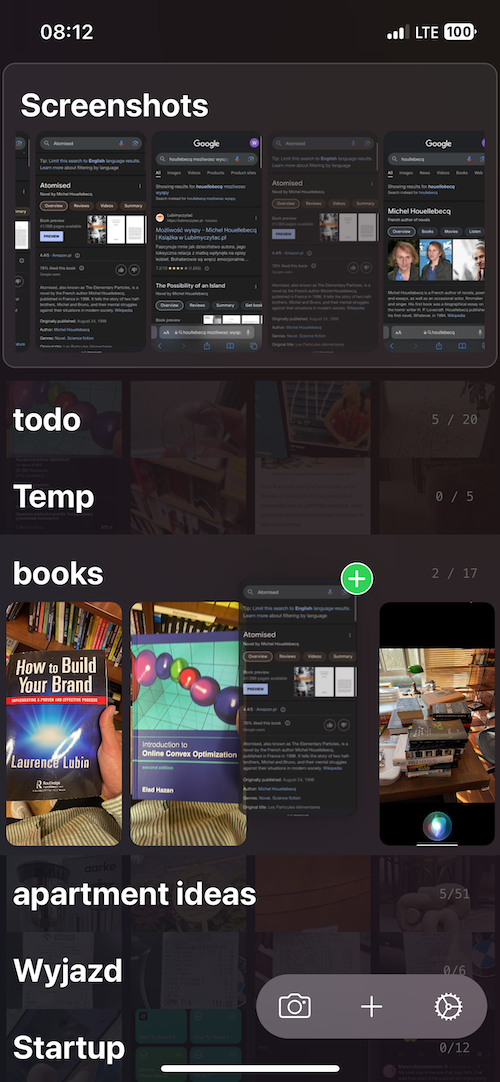
Visual notes for screenshots, ideas, and reminders
Visuel helps you collect screenshots, organize them into clean lists, turn photos into reminders, and share only the pieces worth showing.
Designed for low-friction capture
Collect
Create calm, visual collections for references, ideas, receipts, tasks, inspiration, and anything else that usually disappears into your camera roll.
Act
Add reminders, priorities, and done states so a saved photo can become something you actually follow through on.
Share
Share selected collections through a simple public profile. Useful for moodboards, recommendations, research, and personal archives.
"The key element of the app is how it gets out of your way."
"Your app by far has been the best photo reminder app for me."
"Visuel seems very geared for the analog diary."
FAQ
Download Visuel from the App Store, create collections, and move screenshots into the place they belong.
Yes. Visuel is free to download, with some premium features available as in-app purchases.
Yes. You can publish selected lists through your public Visuel profile.
Start with the screenshots already sitting in your camera roll.